用page显示category看起来不是很有用,但很多人都在用,所以Sola也写了一个可以显示单个或多个分类下文章的page模板,支持分页功能,安装wp pagenavi插件即可。
后台界面
在functions.php中添加如下代码即可使page编辑界面显示category的选择器。
function cp_add_category_box_on_page(){
	//add meta box
	add_meta_box('categorydiv', __('Categories'), 'post_categories_meta_box', 'page', 'side', 'low');
}

add_action('admin_menu', 'cp_add_category_box_on_page');

function cp_mcp_init() {
	if(function_exists('register_taxonomy_for_object_type')){
  		register_taxonomy_for_object_type('category', 'page');
	}
}

add_action('init', 'cp_mcp_init');
于是,后台界面就变成下面这样
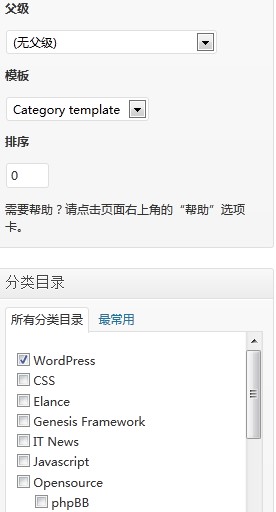
创建page模板
创建一个page模板专门显示category,模板结构如下
- 模板声明
- 正常的page模板,显示page的内容
- 用query_posts修改主循环,根据选择的category显示目录下的文章列表,就跟category页面一样
- 调用wp_pagenavi()函数输出分页
- 调用wp_reset_query()函数重置全局变量
- 输出sidebar和footer,搞定
代码如下所示
<?php
/*
Template Name: Category template
*/
get_header();
?>

	<div id="content" class="hfeed">
		<!-- 显示该页面的内容 -->
		<?php if (have_posts()) : while (have_posts()) : the_post(); ?>

		 <div <?php post_class() ?> id="post-<?php the_ID(); ?>">
			<h2 class="post-title"><?php the_title(); ?></h2>
			<?php the_content(__('More','notepad-theme')); ?>
			<?php wp_link_pages(array('before' => '<p><strong>'.__('Pages:','notepad-theme').'</strong> ', 'after' => '</p>', 'next_or_number' => 'number')); ?>
		</div>
		<!--/post -->

		<?php endwhile; endif; ?>

		<?php
		/* 修改主循环,输出category下的文章 */
		$cats=array();
		foreach(get_the_category() as $category) {
			$cats[]=$category->cat_ID;
		}
		$showposts = 10; // -1表示显示所有文章
		$do_not_show_stickies = 1; // 0 表示不显示置顶文章
		$args=array(
		   'category__in' => $cats,
		   'posts_per_page' => $showposts,
		   'paged' => $paged,
		   'caller_get_posts' => $do_not_show_stickies
		);

		query_posts( $args );
		?>

		<!-- 开始显选择的目录下的示文章 -->
		<?php if( have_posts() ) : ?>

       		<?php while ( have_posts()) : the_post(); ?>

            <div <?php post_class() ?> id="post-<?php the_ID(); ?>">
                <h2><a href="<?php the_permalink() ?>" rel="bookmark" title="Permanent Link to <?php the_title_attribute(); ?>"><?php the_title(); ?></a></h2>
                <small><?php the_time('F jS, Y') ?> <!-- by <?php the_author() ?> --></small>

                <div class="entry">
                    <?php the_excerpt(); ?>
                </div>

                <p class="postmetadata">
				<?php the_tags('Tags: ', ', ', ''); ?> Posted in <?php the_category(', ') ?> | <?php edit_post_link('Edit', '', ' | '); ?>
				<?php comments_popup_link('No Comments »', '1 Comment »', '% Comments »'); ?></p>
            </div>

        <?php endwhile; ?><!-- end loop -->

		<?php else : ?>

			<h2 class="center">Not Found</h2>
			<p class="center">Sorry, but you are looking for something that isn't here.</p>

		<?php endif; ?>
		<!-- 可以直接调用wp pagenavi插件的分页函数显示分页 -->
		<?php wp_pagenavi(); ?>
		<!-- 重置循环变量,必须的步骤 -->
		<?php wp_reset_query(); ?>

	</div><!-- #content -->

	<?php get_sidebar(); ?>

<?php get_footer();?>
效果如下图所示

END
1条评论
评论已关闭。