如果你不想你的网站侧边栏千篇一律,这里有一段代码可以帮助你借助custom field设置自定义侧边栏。
以自定义文章侧边栏为例,首先打开文章模板(例如single.php),在需要显示这个自定义侧边栏的位置放上如下代码
<?php
// Check if custom field for sidebar is set
if(get_post_meta($post->ID, "sidebar", true)){
    // If set, save it
    $sidebar = get_post_meta($post->ID, "sidebar", true);
}
else {
    // If not set, default to your standard sidebar
    $sidebar = 'default-sidebar';
}

// Now echo your sidebar in your template using the $sidebar variable
dynamic_sidebar($sidebar);
?>
接着,打开一篇文章,找到custom field(自定义栏目),点击输入新栏目按钮,输入sidebar,值就是你想在这篇文章调用的sidebar名称。
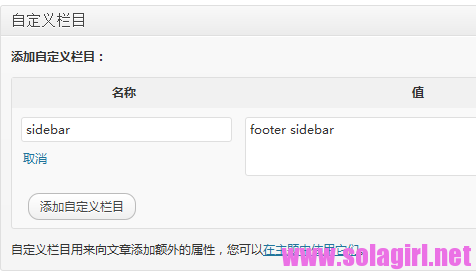
保存后就可以在文章中显示自定义栏目中填写的侧边栏了,前提是这个侧边栏必须存在,如果不存在,请在functions.php中注册之,例如。
register_sidebar(array(
 	'name' => 'footer sidebar,
 	'id' => 'footer-sidebar',
 	'before_widget' => '<div>',
 	'after_widget' => '</div>',
 	'before_title' => '<h3>',
 	'after_title' => '</h3>'
 ));
自定义页面侧边栏的方法同上,编辑模板page.php。
博客折腾的是越来越过瘾了。