用WordPress 作CMS系统,我发现两个比较有用的插件分别是Advanced Custom Field和ET Builder,ACF可以管理和创建漂亮的meta box界面,省去自己写一堆代码界面还不友好的麻烦,这或许是程序员偷懒的好方法;而ET Builder对客户却很有用,很多懂HTML的客户也更喜欢用Page Builder来管理一个CMS类型的WordPress站点。
ET Builder界面精美,提供很多Modules可供使用,但它更强大的地方在于——你可以任意扩展Module,根据每个网站的需求定制Module。但强大的东西也有缺憾,ET Builder的bug让人有些头痛,虽然更新很快,但每次更新都会产生新的bug。
目录
ET Builder扩展
先看强大的地方,扩展Module
这些操作无需修改插件,用钩子的方式即可完成。ET Builder的实质是一个shortcode管理器,用户通过插入各种shortcode(Module)完成界面布局,例如分栏控制、灯箱图集等等。然后,插件将数据存储到每篇文章的post meta中,如果用户没有选择禁用Page Builder,这篇文章的内容就由这个post meta决定。
要扩展出一个新的Module,需要:
- 创建Module的界面
- 创建Module对应的shortcode,这个shortcode根据用户的选择产生内容
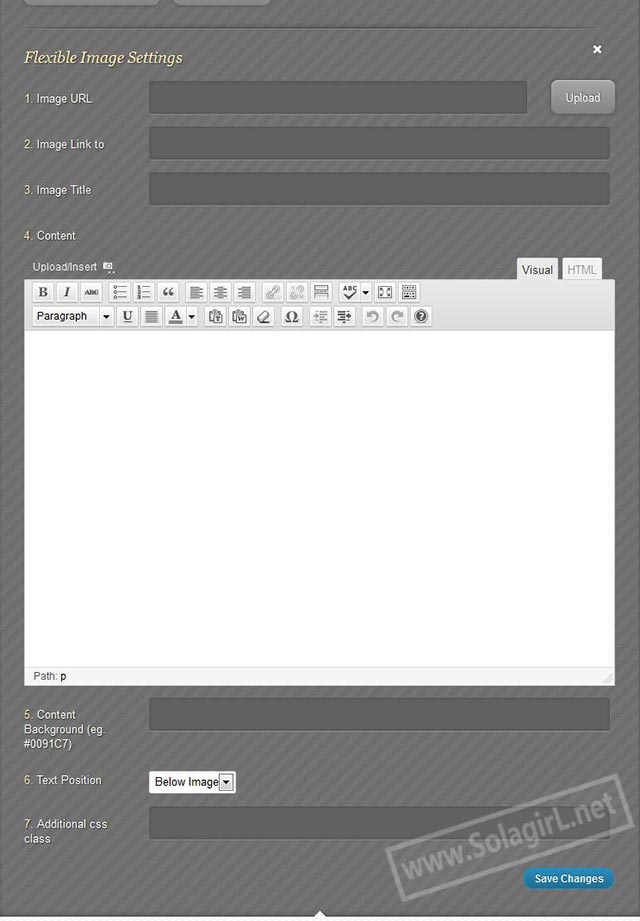
例如要创建一个自定义字段的image module,在functions.php中使用如下代码创建Module界面
add_filter('et_lb_modules',  'custom_et_modules');
function custom_et_modules($et_lb_modules){
$et_lb_modules['flexible_image'] = array(
        'name' => __('Flexible Image', 'Convertible'),
        'options' => array(
            'image_url' => array(
                    'title' => __('Image URL', 'Convertible'),
                    'type' => 'upload'
            ),
            'image_uri' => array(
                    'title' => __('Image Link to', 'Convertible'),
                    'type' => 'text'
            ),
            'image_title' => array(
                    'title' => __('Image Title', 'Convertible'),
                    'type' => 'text'
            ),
            'caption' => array(
                    'title' => __('Content', 'Convertible'),
                    'type' => 'wp_editor',
                    'is_content' => true
            ),
            'content_bg' => array(
                    'title' => __('Content Background (eg. #0091C7)', 'Convertible'),
                    'type' => 'text'
            ),
            'text_position' => array(
                    'title' => __('Text Position', 'Convertible'),
                    'type' => 'select',
                    'options' => array( __('Above Image', 'Convertible'), __('Below Image', 'Convertible')),
                    'std' => __('Below Image', 'Convertible')
            ),
            'css_class' => array(
                    'title' => __('Additional css class', 'Convertible'),
                    'type' => 'text'
            )
        )
    );
    return $et_lb_modules;
}
这个image module有6个字段,分别为Image URl、Image链接地址、Image 标题、caption、Image box的背景色、文字描述的位置以及自定义css class。
乍一看去,很难理解这些选项是用来作什么的,因为现在的需求是定制化,不是大众化。
接下来,创建shortcode,不用在意代码有多少,因为无论多复杂的shortcode代码,都不过是读取参数,产生一段HTML内容罢了。
add_shortcode('et_lb_flexible_image','et_new_lb_flexible_image');
function et_new_lb_flexible_image($atts, $content = null) {
    extract(shortcode_atts(array(
                'image_url' => '',
                'image_uri' => '',
                'image_title' => '',
                'content_bg' => '',
                'text_position' => 'Below Image'
                    ), $atts));

    $attributes = et_lb_get_attributes($atts, "et_lb_image");
    if ('' != $imagesize) {
        $image_size = explode('x', $imagesize);
        $image_size = array_map('intval', $image_size);
    }

    $image = $image_url;
    $content_bg = $content_bg ? 'style="background: '.$content_bg.'"' : '';
    $content_position = ($text_position == "Below Image")? 'pos_bottom' : 'post_top';
    if ('' != $image)
        $image = "<img alt='".esc_attr($image_title)."' src='" . esc_url($image) . "' title='".esc_attr($image_title)."' />";
    $image_output = "<div class='et_lb_image_box $content_position'>" . ('' != $image_uri ? '<a href="'.esc_url($image_uri).'" >' : '') .
           $image . ('' != $image_uri? '</a>':'') . '</div>';

    $content_output = '<div class="et_lb_image_content '.$content_position.'" '.$content_bg.'>' . do_shortcode(et_lb_fix_shortcodes($content)) . '</div>';

    if( $text_position == 'Above Image' ) $output = $content_output . $image_output;
    else $output = $image_output . $content_output;
    $output = "<div {$attributes['class']}{$attributes['inline_styles']}>
					<div class='et_lb_module_content'>
						<div class='et_lb_module_content_inner clearfix'>" .
                                                   $output .
            "		</div> <!-- end .et_lb_module_content_inner -->
					</div> <!-- end .et_lb_module_content -->
				</div> <!-- end .et_lb_widget_area -->";


    return $output;
}
这样,就有了下面的效果。
后台界面
在前台实现了如下效果
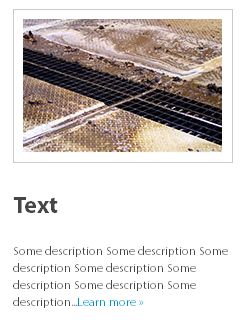
有些CMS页面布局比较复杂,如果都用Widget来管理,会让人疯掉的。类似上面的结构可以用widget来实现,但有了Page Builder,管理就更方便了。
ET Builder 缺憾
缺憾嘛,就一个,bug有点多。用了一两个月,至少更新过两次,但总是旧的bug去了,新的bug又来了,还有些顽疾一直去不掉。
例如,
ET Builder和ACF的管理界面冲突,或者说它会跟所有使用post.php但页面上没有page builder的后台界面冲突,不仅影响ACF管理界面,还会影响custom post type编辑界面。这是由一个js错误引起的。
ET Builder的Sample layout不知道是太久没更新了还是怎么的,解析的总是不对,幸好这东西只是实例,实际中没人会用到它。
还有一个最让我头痛的地方,当用户使用分栏同时又要求主题Responsive时,就会很麻烦,因为分栏的数目是完全自定义的,宽度也是完全自定义的,而且使用百分比,很难让这些不确定的内容完美的Responsive。
结语
虽然有缺憾,但无法否定其强大的地方,而且价格在所有Page Builder中算是最便宜的了,对我来说,值得一用。
Have you heard of Visual Composer? Very easy to use. But don’t know if there’s any bug.
Yes, I have. Visual Composer is much more powerful than ET Builder, and it’s my best option for page builder now. I’ve purchased visual composer from themeforest as well as a theme that utilized this plugin named jupiter. I use this plugin to build websites with complex layout.
As for bugs,I found something wrong when using custom shortcode inside the text module.