Shadowbox是一款非常灵活的灯箱效果jquery插件,可以集成到WordPress中取代WordPress默认的thickbox,实现gallery特效,灯箱效果打开外部页面等效果,本文介绍如何简单的将Shadowbox集成到WordPress中。
目录
Shadowbox使用方法
首先打开http://www.shadowbox-js.com查看介绍,Usage中有详细的使用说明,大体如下
1.引入样式表和js脚本
<link rel="stylesheet" type="text/css" href="shadowbox.css">
<script type="text/javascript" src="shadowbox.js"></script>
2. 初始化Shadowbox
<script type="text/javascript">
Shadowbox.init();
</script>
3. HTML Markup
要想激活shadowbox,就要给a标签添加rel="shadowbox"属性,例如
<a href="myimage.jpg" rel="shadowbox">My Image</a>
<a href="http://www.google.com.hk" rel="shadowbox">My Image</a>
如何将Shadowbox集成到WordPress中
集成到WordPress中,步骤与使用Shadowbox大体相同,只是要用WordPress的语言来描述。这里以默认主题twentyeleven为例。
集成Shadowbox有专门插件,但如果你想明白到底发生了什么,下面我会告诉你。
1. 下载Shadowbox脚本
到Shadowbox下载页面,adapter选择jquery,选好自己需要的功能,点击页面底部的zip或tar格式下载即可。
下载后将Shadowbox文件夹放到WordPress主题的根目录,重命名为shadowbox(可选步骤)。
2. 创建使用shadowbox的WordPress模版
创建page-shadowbox.php文件,打开文件,写模版声明,模版命名为Shadowbox
<?php
/*
 * Template Name: Shadowbox
 */
3.引入Shadowbox脚本和样式表
add_action('wp_enqueue_scripts', 'shadowbox_load_resources');
function shadowbox_load_resources() {
    wp_enqueue_script('shadowbox', get_template_directory_uri() . '/shadowbox/shadowbox.js', array('jquery'));
    wp_enqueue_style('shadowbox', get_template_directory_uri() . '/shadowbox/shadowbox.css');
}
4. 初始化Shadowbox
add_action('wp_footer', 'shadowbox_init');
function shadowbox_init(){
    ?>
    <script type="text/javascript">
        Shadowbox.init();
    </script>
    <?php
}
5. 下面开始写模版文件即可
page-shadowbox.php的文件代码如下
<?php
/*
 * Template Name: Shadowbox
 */

/*
 * Load shadowbox stylesheet and javascript
 * You can load shadowbox globally by put the code snippets into functions.php
 */
add_action('wp_enqueue_scripts', 'shadowbox_load_resources');
function shadowbox_load_resources() {
    wp_enqueue_script('shadowbox', get_template_directory_uri() . '/shadowbox/shadowbox.js', array('jquery'));
    wp_enqueue_style('shadowbox', get_template_directory_uri() . '/shadowbox/shadowbox.css');
}

/*
 * Init shadowbox at footer, make sure to load shadowbox.js first
 */
add_action('wp_footer', 'shadowbox_init');
function shadowbox_init(){
    ?>
    <script type="text/javascript">
        Shadowbox.init();
    </script>
    <?php
}

/*
 * Now we can start writing the template
 */
get_header();
?>

<div id="primary">
    <div id="content" role="main">

        <?php while (have_posts()) : the_post(); ?>

            <?php get_template_part('content', 'page'); ?>

            <?php comments_template('', true); ?>

<?php endwhile; // end of the loop.  ?>

    </div><!-- #content -->
</div><!-- #primary -->

<?php get_footer(); ?>
6. 创建一个页面
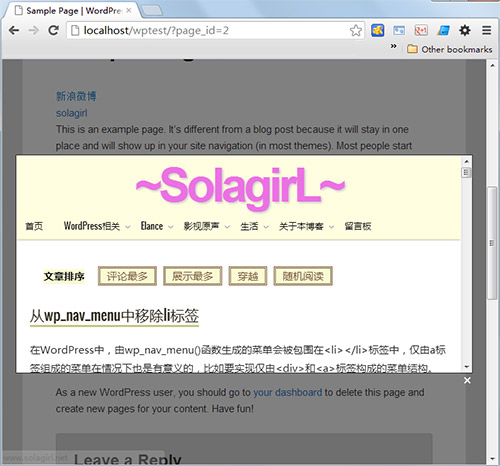
选择模版Shadowbox,在编辑器中输入一些链接,记得加上rel="shadowbox"属性激活shadowbox,比如写
<a href="https://solablog.top" rel="shadowbox">solagirl</a>
发布文章后,点击链接看到如下效果
结语
有兴趣的朋友可以下载本例源代码自己尝试一下。
[download id=44]
引入Shadowbox的脚本后,就可以使用任何Shadowbox支持的功能,可以看一下Shadowbox Options,了解能实现哪些功能。
如果想全站开启Shadowbox,只需要将get_header()之前的代码放到functions.php中就行了。
好像有点复杂,呵呵!
那可以用shadowbox wordpress插件