如果你喜欢在WordPress使用CKEditor作为默认编辑器,那么一定要安装CKEditor For WordPress插件,这个是目前最好的。本文要介绍的定制WordPress CKEditor方法均基于此插件。
目录
如何为编辑器增加新的插件
CKEditor有很多优秀的插件,CKEditor For WordPress插件自带的已经很多了,但并不完整,如果有你更喜欢的,可以用代码加上。方法如下所示。
1. 浏览CKEditor插件,挑选自己喜欢的,本文就以Equations和CodeMirror插件为例,下载这两个插件。
2. 编辑器是功能性的,不应该随着主题的更换而消失,所以我决定以插件的方式添加。
3. 创建插件目录
在wp-content/plugins/目录下创建新目录ckeditor-plugins,将刚刚下载的两个创建目录拷贝到此目录下,创建插件主文件,就叫ckeditor-plugins.php吧,这样,该插件的目录结构应该是这样的
wp-content/plugins/ckeditor-plugins/
      --equation/
      --codemirror/
      --ckeditor-plugins.php
4. 将插件集成到编辑器中。
前提是启用CKEditor For WordPress插件哦。然后开始编辑ckeditor-plugins.php文件吧。
首先要写插件声明,然后是代码,废话不多说,直接列出全部代码。
<?php
/**
 * Plugin Name: My CKEditor Plugins
 * Description: Intergrate a collection of ckeditor plugins into WordPress CKEditor.
 * Author: 自豪的写上你的大名吧
 */

/**
 * The code demonstrates how to add external plugins to ckeditor
 *
 * CKEditor is intergrated into WordPress by CKEditor For WordPress plugin.
 * Please activate CKEditor For WordPress before moving on.
 */
add_action('init', 'my_ckeditor_plugins');

function my_ckeditor_plugins() {
    add_filter('ckeditor_external_plugins', 'register_my_ckeditor_plugins');
    add_filter('ckeditor_buttons', 'register_my_ckeditor_buttons');
}

//Load external ckeditor plugins
function register_my_ckeditor_plugins($plugins) {
    $plugins['equation'] = plugin_dir_url(__FILE__).'/equation/';
    $plugins['codemirror'] = plugin_dir_url(__FILE__).'/codemirror/';
    return $plugins;
}

//Add more buttons
function register_my_ckeditor_buttons($buttons) {
    $buttons[] = array('Equation');
    $buttons[] = array('Source');
    return $buttons;
}
?>
CKEditor For WordPress插件为我们提供了两个filters,可以加载外部插件、增加新的按钮
- ckeditor_external_plugin
- ckeditor_buttons
上述代码就是通过这两个filters将Equations和CodeMirror插件集成到CKEditor中。
5. 检查结果
到后台启用插件,打开一篇文章,就可以看到这两个按钮了。
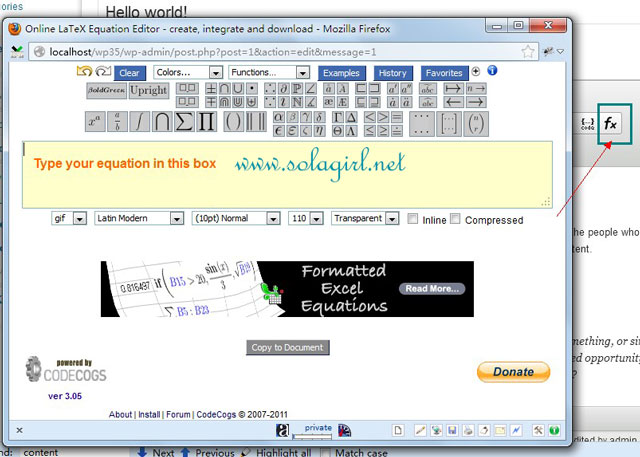
Equations是一个在线编辑公式的东西,如果你需要频繁的写一些公式,这家伙很有用。
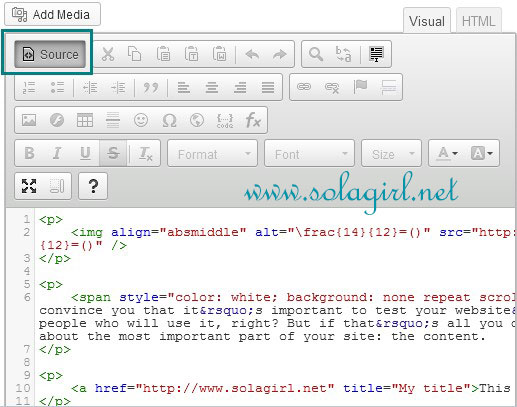
CodeMirror则是一款代码高亮插件,与syntaxhighlighter不同的是,这款插件可以让CKEditor本身的HTML编辑界面具备代码高亮功能,点击Source按钮即可看到效果
如何在前台使用CKEditor
如果你需要在前台使用CKEditor,一种方法是CKEditor For WordPress插件默认提供的,即将评论框替换为CKEditor,不过可定制化不强。
想自己定制,怎么办呢。
举个例子,要做个让用户在前台提交文章的功能,例如投稿,需要开启所见即所得编辑器功能,当然你可以用tinyMCE(wp_editor()),不过今天的主角是CKEditor
注:以下代码放在插件中或者主题的functions.php中均可,自己选吧。
1. 引入CKEditor脚本
如果你开启了将评论框替换成CKEditor的功能,那么在有评论框的页面,这部分代码可以省略
wp_enqueue_script('editor');
wp_enqueue_script('ckeditor', plugins_url() . "/ckeditor-for-wordpress/ckeditor/ckeditor.js");
2. 初始化CKEditor
先要有对象,随便找个地方写一个textarea,例如page模版中
<textarea id="ckeditor" name="ckeditor"></textarea>
然后用CKEditor.replace方法将这个textarea替换成CKEditor,初始化代码加载到footer(body结束之前)
add_action('wp_footer','init_my_ckeditor',100);
function init_my_ckeditor(){
    ?>
    <script type="text/javascript">
        CKEDITOR.replace( 'ckeditor', {
            toolbar: [
                { name: 'document', items: [ 'Source', '-', 'NewPage', 'Preview', '-', 'Templates' ] },
		{ name: 'clipboard', items : [ 'Cut','Copy','Paste','PasteText','PasteFromWord','-','Undo','Redo' ] },
		{ name: 'editing', items : [ 'Find','Replace','-','SelectAll','-','Scayt' ] },
		{ name: 'insert', items : [ 'Image','Flash','Table','HorizontalRule','Smiley','SpecialChar','PageBreak'
                 ,'Iframe' ] },
		{ name: 'styles', items : [ 'Styles','Format' ] },
		{ name: 'basicstyles', items : [ 'Bold','Italic','Strike','-','RemoveFormat' ] },
		{ name: 'paragraph', items : [ 'NumberedList','BulletedList','-','Outdent','Indent','-','Blockquote' ] },
		{ name: 'links', items : [ 'Link','Unlink','Anchor' ] },
		{ name: 'tools', items : [ 'Maximize','-','About' ] }
            ],
            uiColor: '#9AB8F3'
        });
    </script>
    <?php
}
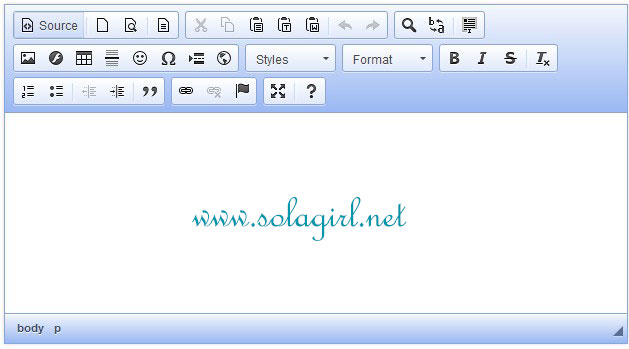
toolbar用于指定按钮,每一行按钮在编辑器看就是一个分组;uiColor则控制编辑器的toolbar颜色,效果如下图所示
你会发现,刚刚使用插件集成的Equation和CodeMirror插件无法加载到前台的编辑器中,即使将这两个按钮加入,也不会有任何反应,因为CKEditor提供的两个filter只能将插件集成到后台界面中。
要想往前台编辑器添加CKEditor 插件怎么办呢?
要在初始化脚本里做点手脚,代码变化见注释
wp_enqueue_script('editor');
wp_enqueue_script('ckeditor', plugins_url() . "/ckeditor-for-wordpress/ckeditor/ckeditor.js");
add_action('wp_footer','init_my_ckeditor',100);
function init_my_ckeditor(){
    ?>
    <script type="text/javascript">
        //注册外部插件equation和codemirror
        CKEDITOR.config.extraPlugins += ( CKEDITOR.config.extraPlugins ? ',equation,codemirror' : 'equation,codemirror' );
        CKEDITOR.plugins.addExternal('equation', '<?php echo plugins_url(); ?>/ckeditor-plugins/equation/');
        CKEDITOR.plugins.addExternal('codemirror', '<?php echo plugins_url(); ?>/ckeditor-plugins/codemirror/');

        CKEDITOR.replace( 'ckeditor', {
            toolbar: [
                //Source就是CodeMirror的按钮
                { name: 'document', items: [ 'Source', '-', 'NewPage', 'Preview', '-', 'Templates' ] },
                { name: 'clipboard', items : [ 'Cut','Copy','Paste','PasteText','PasteFromWord','-','Undo','Redo' ] },
                { name: 'editing', items : [ 'Find','Replace','-','SelectAll','-','Scayt' ] },
                { name: 'insert', items : [ 'Image','Flash','Table','HorizontalRule','Smiley','SpecialChar','PageBreak'
                 ,'Iframe' ] },
                { name: 'styles', items : [ 'Styles','Format' ] },
                { name: 'basicstyles', items : [ 'Bold','Italic','Strike','-','RemoveFormat' ] },
                { name: 'paragraph', items : [ 'NumberedList','BulletedList','-','Outdent','Indent','-','Blockquote' ] },
                { name: 'links', items : [ 'Link','Unlink','Anchor' ] },
                //添加Equation按钮
                { name: 'tools', items : [ 'Maximize','-','About','Equation' ] }
            ],
            uiColor: '#9AB8F3'
        });

    </script>
    <?php
}
效果如下

相关资料
版大!我按照上面的做法,無法出現該插件的按鈕耶
这文章有点久了,我没在最新版WordPress上试验过,更何况,ckeditor的作者已经不再支持WordPress Ckeditor插件了,要是想长期用,考虑换别的吧。
不好意思,代码被过滤了,因为wp会过滤游客发布的评论内容,有些标签会被删除,本站设定的是用pre标签包围的内容不被过滤,麻烦你按照本站发布代码说明(发表评论下面有写)重发一下代码,或者直接回复本站的评论邮件通知。带来的不便表示抱歉:)
一直裸奔,学习一下,感觉有些小复杂……
用CKEditor纯属个人习惯问题,默认编辑器的功能对写日志来说已经足够了,但需要创建比较复杂的页面结构时,就需要提升一下编辑器的能力。我两个编辑器都用,各有个各的好处。